
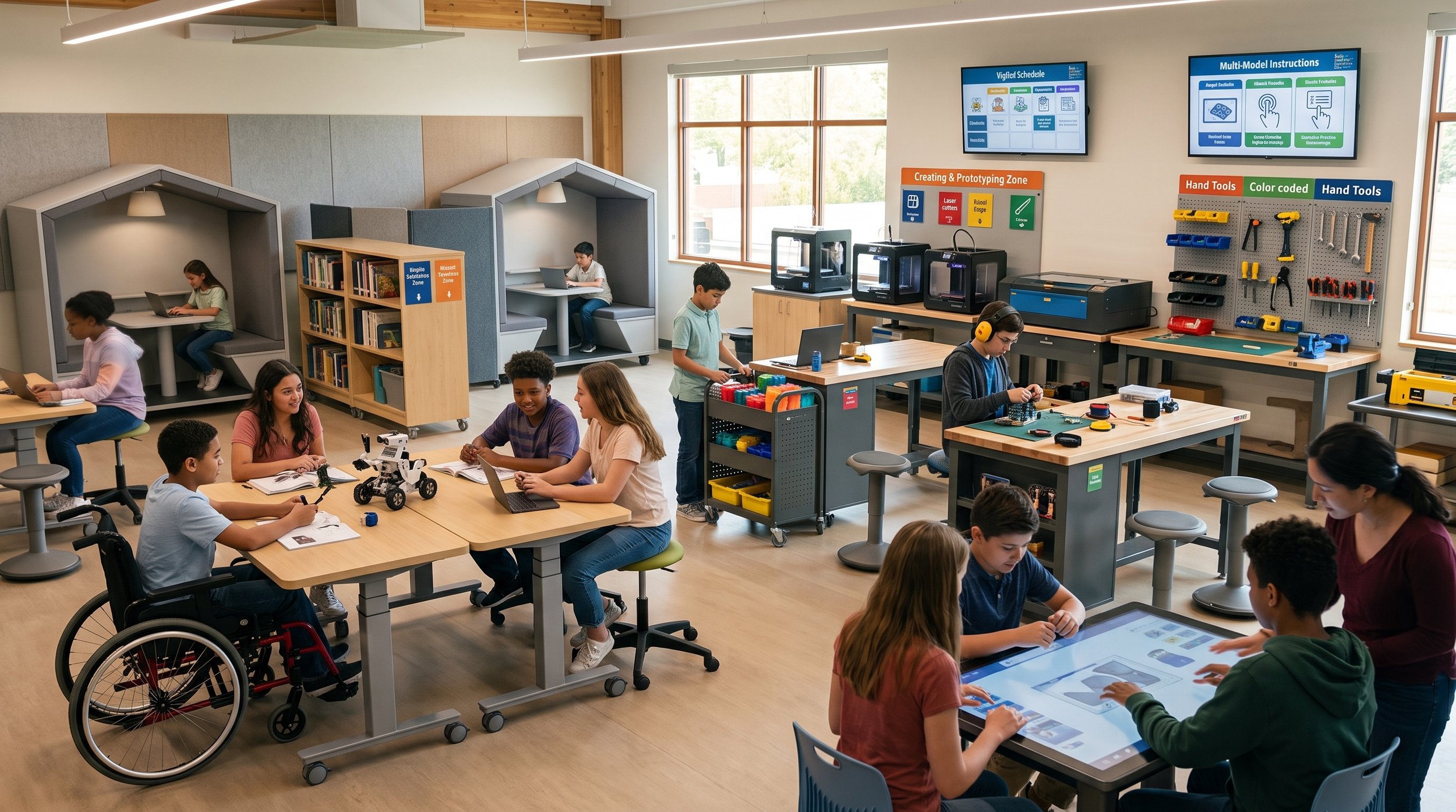
STEAM learning spaces and makerspaces are inherently dynamic, tactile, and sensory-intense. While these environments foster innovation, exposing students to an unorganized, high-stimulation room filled with unpredictable machinery noise and physical clutter creates significant barriers to focus and participation.
Research on inclusive STEAM design proves that spatial zoning—dividing multi-sensory fabrication spaces into distinct, purpose-driven areas with clear physical boundaries—is essential for supporting neurodivergent students (including those with Autism, ADHD, or sensory processing differences) while elevating problem-solving outcomes for neurotypical learners alike.
By pairing spatial zoning with Universal Design for Learning (UDL) principles, educators and facility leaders can replace chaotic environments with structured spaces tailored to varied sensory, cognitive, and physical needs.
Here is how to architect a UDL-aligned, zoned STEAM learning commons engineered for inclusive engineering, creative prototyping, and self-regulation.
The 7 Essential STEAM Spatial Zones
1. Ideation Station
The Design: Tailored for the initial stages of design thinking, brainstorming, mind-mapping, and project blueprinting. Features high-backed acoustic booths, writeable desktop surfaces, dimmable task lighting, and digital devices equipped with noise-canceling headphones.
The Impact: Gives hyper-sensitive or easily distracted students a quiet, predictable environment to research, code, CAD model, and blueprint before moving into physical fabrication.
UDL Alignment:
Representation: Offers multiple ways to visualize ideas through mind maps, visual schematics, and digital modeling.
Action & Expression: Provides quiet modalities for goal-setting, planning, and executive strategy.
2. Makerspace & Prototyping Zone
The Design: A tactile, durable workshop engineered for physical building, structural engineering, prototyping, and assembly. Outfitted with heavy-duty workbenches, color-coded tool pegboards, explicit floor safety markings, standing-height desks, and categorized raw materials (cardboard, textiles, timber).
The Impact: Allows sensory-seeking and kinesthetic learners (such as those with ADHD) to satisfy physical movement and tactile needs through hands-on building, tool manipulation, and spatial engineering.
UDL Alignment:
Action & Expression: Integrates tactile physical action, tool manipulation, and spatial construction.
Engagement: Maintains high interest through authentic, active trial-and-error prototyping.
3. Digital Design & Fabrication Lab
The Design: A clean, advanced tech hub for computer-aided design (CAD), 3D modeling, robotics programming, and digital manufacturing.
The Impact: Separates quiet digital synthesis from messy material building. It creates a focused, low-dust environment where students can transition from abstract coding to precise digital fabrication.
UDL Alignment:
Representation: Transforms complex code and vector designs into visual, interactive 3D models.
Action & Expression: Provides alternative technological tools for expressing technical solutions.
4. Scientific Inquiry & Observation Station
The Design: An experimental space designed for empirical testing, data gathering, sensor analysis, and biological or physical observation.
The Impact: Establishes a controlled environment for systematic testing. Explicit task boundaries allow students to record measurements and analyze variable data without interference from active power tools.
UDL Alignment:
Representation: Facilitates data collection across multiple sensory channels (visual graphs, digital probes, observation logs).
5. Media & Digital Arts Studio
The Design: A dedicated creative studio for audio-visual editing, graphic design, podcasting, and digital storytelling. Outfitted with acoustic foam wall padding, green screen curtains, adjustable LED ring lights, and explicit visual step-by-step workflow charts.
The Impact: Facilitates digital storytelling and media production with clear environmental cues that scaffold complex, multi-step creative projects, providing acoustic isolation from workshop noise.
UDL Alignment:
Action & Expression: Offers diverse media channels (video, audio, graphics) for demonstrating subject mastery.
6. Exhibition & Pitch Arena
The Design: An interactive presentation stage and showcase area equipped with modular seating, presentation displays, and perimeter demonstration tables for live testing, peer critique, and project showcases.
The Impact: Prepares students for public synthesis and critique in a structured, predictable layout. Defined spatial boundaries reduce performance anxiety during live demonstrations.
UDL Alignment:
Engagement: Fosters community engagement, peer feedback, and authentic pride in finished work.
7. Sensory Retreat
The Design: Positioned along the room's outer perimeter away from 3D printers, drills, or power tools. Features acoustic divider screens, soft compression seating, dim lighting, and somatic grounding tools.
The Impact: Provides students an immediate escape route to decompress when high ambient noise, visual chaos, or intense group dynamics trigger sensory overload or emotional dysregulation.
UDL Alignment:
Engagement (Self-Regulation): Empowers students with coping mechanisms and sensory resets, allowing them to regulate their nervous systems and re-engage in learning.
Key Research-Backed Benefits
Implementing an evidence-based zoning strategy in STEAM spaces delivers measurable cognitive and operational advantages:
Sensory Overload Mitigation: STEAM spaces are inherently loud and visually intense; dedicated low-stimulation perimeter zones prevent sensory burnout and anxiety spikes caused by heavy equipment or rapid peer chatter.
Executive Function Scaffolding: Explicit spatial separation visually guides students through the design-thinking lifecycle, making task switching and multi-step project management significantly easier.
Kinesthetic Channeling: Dedicated build areas give movement-seeking students constructive outlets for physical energy without disrupting peers who require quiet for coding or writing.
Psychological Safety & Autonomy: Empowering students to self-select their work zone based on their real-time sensory and cognitive state builds self-advocacy and resilience during trial-and-error prototyping.
Driving Meaningful Change
Unlocking human potential in hands-on technical disciplines requires thoughtful spatial engineering. When educational institutions shift the responsibility of adaptation off the student and onto the environment, they transform high-stimulation makerspaces into inclusive, self-regulating hubs of innovation.
Core Research & Architectural ReferencesInclusive Makerspace Strategies: Edutopia. Encouraging Neurodiversity in Your Makerspace or Classroom.Special Needs STEM Layouts: School Specialty. Creating an Inclusive Makerspace for Students with Special Needs.STEM Spatial Layout & Active Learning: RJPN Journal of Educational Technology. Adapting Classroom Design for STEM Learning.Sensory Zoning Frameworks: American Planning Association (APA). Sensory Zoning Frameworks for Educational Spaces.Neurodiverse Design Standards: AHFE International. Inclusive Design Strategies for Neurodiverse Learning Environments.Perimeter Zoning & Multi-Use Inclusion: Gensler Research. Creating Inclusive Spaces by Designing for Neurodiversity.